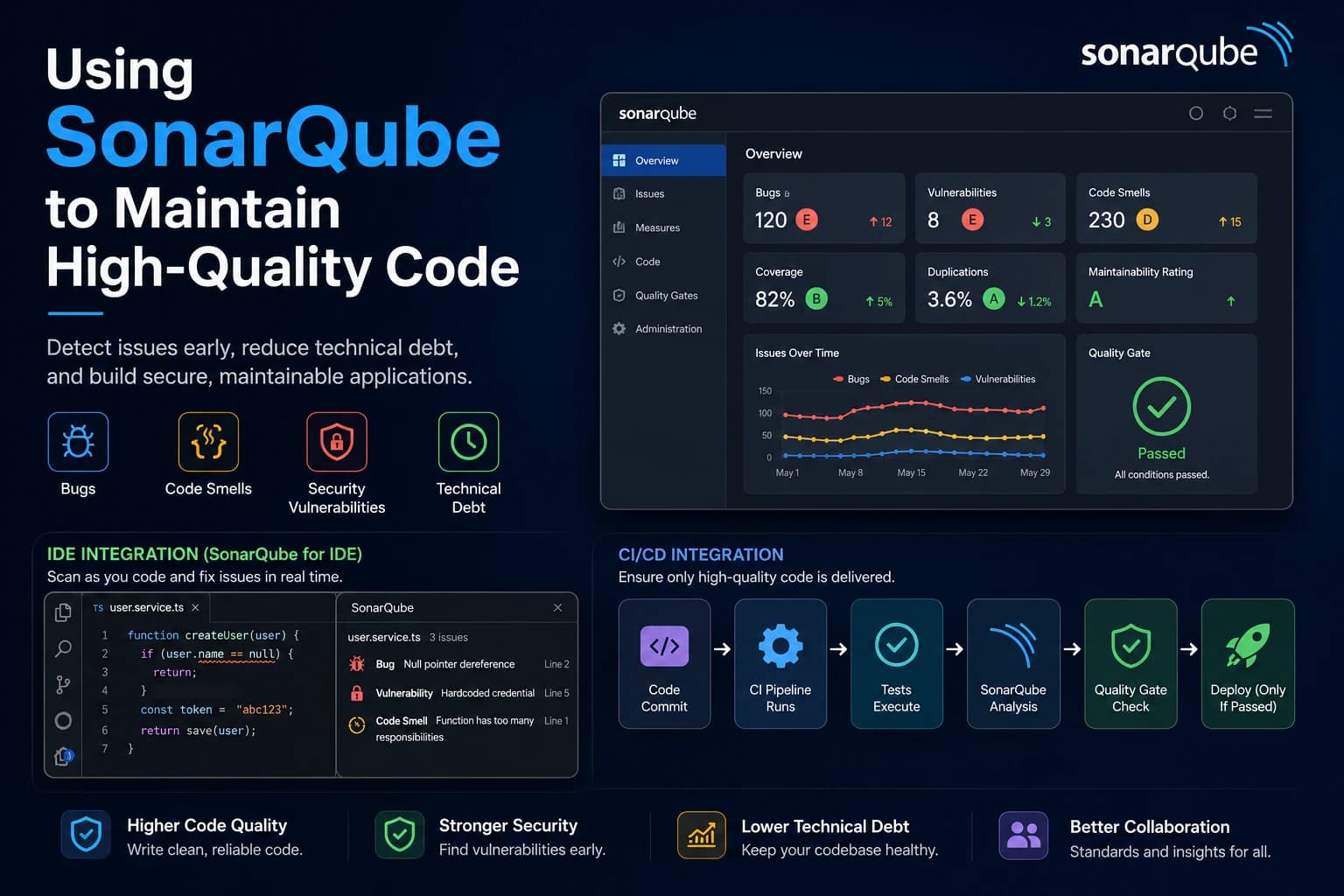
Using SonarQube to Maintain High-Quality Code
Writing code that works is only the first step. The real challenge is writing code that's clean, secure, maintainable, and reliable over time. As projects grow and teams expand, maintaining code quality becomes increasingly difficult.
This is where SonarQube comes in.
SonarQube is a powerful static code analysis platform that helps developers identify bugs, security vulnerabilities, code smells, and technical debt before they make their way into production. Instead of relying solely on manual code reviews, SonarQube continuously analyzes your codebase and provides actionable insights to improve its overall quality.
Whether you're working on a personal side project or an enterprise application, integrating SonarQube into your development workflow can significantly improve code quality and team productivity.
What Is SonarQube?
SonarQube is an open-source platform for continuous code inspection. It scans your source code and evaluates it against hundreds of predefined rules to identify potential issues.
It supports more than 30 programming languages, including:
- Java
- JavaScript
- TypeScript
- Python
- C#
- C++
- Go
- Kotlin
- PHP
Instead of only checking whether your code compiles, SonarQube evaluates how well your code is written.
What Does SonarQube Detect?
1. Bugs
SonarQube identifies coding mistakes that could lead to incorrect behavior or application crashes.
Examples include:
- Null pointer exceptions
- Unused variables
- Incorrect conditions
- Infinite loops
- Resource leaks
Catching these issues early reduces production bugs.
2. Code Smells
Code smells aren't necessarily bugs, but they indicate poor design or maintainability issues.
Examples include:
- Duplicate code
- Long methods
- Large classes
- Deep nesting
- Complex conditional logic
- Poor naming conventions
Reducing code smells makes your code easier to understand and maintain.
3. Security Vulnerabilities
Security should never be an afterthought.
SonarQube scans your code for common vulnerabilities such as:
- SQL Injection
- Cross-Site Scripting (XSS)
- Hardcoded credentials
- Weak cryptography
- Insecure authentication patterns
Fixing security issues early is far easier than responding to a production incident.
4. Technical Debt
Technical debt represents the extra work created by shortcuts taken during development.
SonarQube estimates:
- Time required to fix issues
- Overall maintainability
- Code complexity
- Areas requiring refactoring
This helps teams prioritize improvements instead of guessing what needs attention.
Quality Gates: Prevent Bad Code from Reaching Production
One of SonarQube's most valuable features is Quality Gates.
A Quality Gate defines minimum standards that your code must meet before it can be merged or deployed.
For example:
- No new critical bugs
- No high-severity vulnerabilities
- Minimum code coverage of 80%
- No duplicated code above a certain threshold
If the project fails these conditions, the Quality Gate fails—helping prevent low-quality code from entering your main branch.
SonarQube for IDE: Catch Issues Before You Commit
One of the best features of the SonarQube ecosystem is the SonarQube for IDE extension (formerly SonarLint).
Instead of waiting for your CI/CD pipeline or a pull request review to discover problems, the extension analyzes your code as you write it.
It is available for popular IDEs, including:
- Visual Studio Code
- IntelliJ IDEA
- Eclipse
- Visual Studio
- JetBrains IDEs
As soon as you save or edit a file, the extension scans it in real time and highlights issues directly in your editor.
It can detect:
- Bugs
- Security vulnerabilities
- Code smells
- Duplicate code
- Maintainability issues
You'll see warnings directly beside the affected lines, along with a clear explanation of:
- Why it's a problem
- Its severity
- How to fix it
- Best practices to follow
This creates an incredibly fast feedback loop.
Write Code ↓SonarQube for IDE Scans Automatically ↓Issues Are Highlighted Instantly ↓Fix Problems Immediately ↓Commit Cleaner Code ↓CI/CD Passes with Fewer SurprisesIf your organization uses a centralized SonarQube server, you can connect the IDE extension to it. This ensures that the same coding standards and Quality Profiles enforced in your CI/CD pipeline are also applied locally while you're developing.
Instead of discovering 20 issues after opening a pull request, you'll often fix them within seconds of writing the code.
Think of it as having an experienced reviewer sitting beside you, continuously checking your code for quality, security, and maintainability.
Integrating SonarQube into CI/CD
SonarQube becomes even more powerful when integrated into your CI/CD pipeline.
A typical workflow looks like this:
Developer Pushes Code │ ▼GitHub / GitLab │ ▼CI Pipeline Runs │ ▼Tests Execute │ ▼SonarQube Analysis │ ▼Quality Gate Check │ ▼Deploy (Only If Passed)By automating code analysis, every commit is evaluated consistently without relying entirely on manual reviews.
Why Teams Use SonarQube
Modern development teams use SonarQube because it helps them:
- Catch bugs before production
- Improve code readability
- Reduce technical debt
- Enforce coding standards
- Strengthen application security
- Improve maintainability
- Support code reviews with objective metrics
Instead of debating code quality, teams can rely on measurable standards.
Best Practices
To get the most value from SonarQube:
- Install the SonarQube for IDE extension and use it daily.
- Run code analysis on every pull request.
- Configure meaningful Quality Gates.
- Address critical issues before merging.
- Avoid ignoring warnings without a valid reason.
- Monitor technical debt regularly.
- Combine SonarQube with automated testing.
- Review trends over time instead of focusing only on individual scans.
Remember, SonarQube is most effective when used continuously rather than occasionally.
Common Misconceptions
"SonarQube replaces code reviews."
It doesn't.
SonarQube automates repetitive quality checks, allowing reviewers to focus on architecture, business logic, scalability, and design decisions.
"If SonarQube passes, my code is perfect."
Not necessarily.
Static analysis can detect many issues, but it can't fully understand business requirements, user experience, or architectural trade-offs.
Human reviews and testing remain essential.
Is SonarQube Worth Learning?
Absolutely.
Many companies use SonarQube as a mandatory part of their engineering workflow to maintain consistent code quality across large teams and complex applications.
Understanding how to interpret SonarQube reports, fix issues, and maintain a healthy Quality Gate is a valuable skill for backend, frontend, and full-stack developers alike.
It also encourages better engineering habits by helping you identify problems before they become expensive technical debt.
Final Thoughts
Writing software isn't just about making features work—it's about building systems that remain reliable, secure, and maintainable as they evolve.
SonarQube acts as an automated quality assistant, continuously scanning your code for bugs, vulnerabilities, code smells, and maintainability issues. Combined with automated testing, code reviews, and CI/CD pipelines, it helps teams deliver cleaner and more dependable software.
Even better, by installing the SonarQube for IDE extension, you can catch and fix issues while writing code, making your development process faster and reducing the number of problems that reach your pull requests.
If your goal is to write production-ready code—not just code that works—SonarQube is one of the best tools you can add to your workflow.