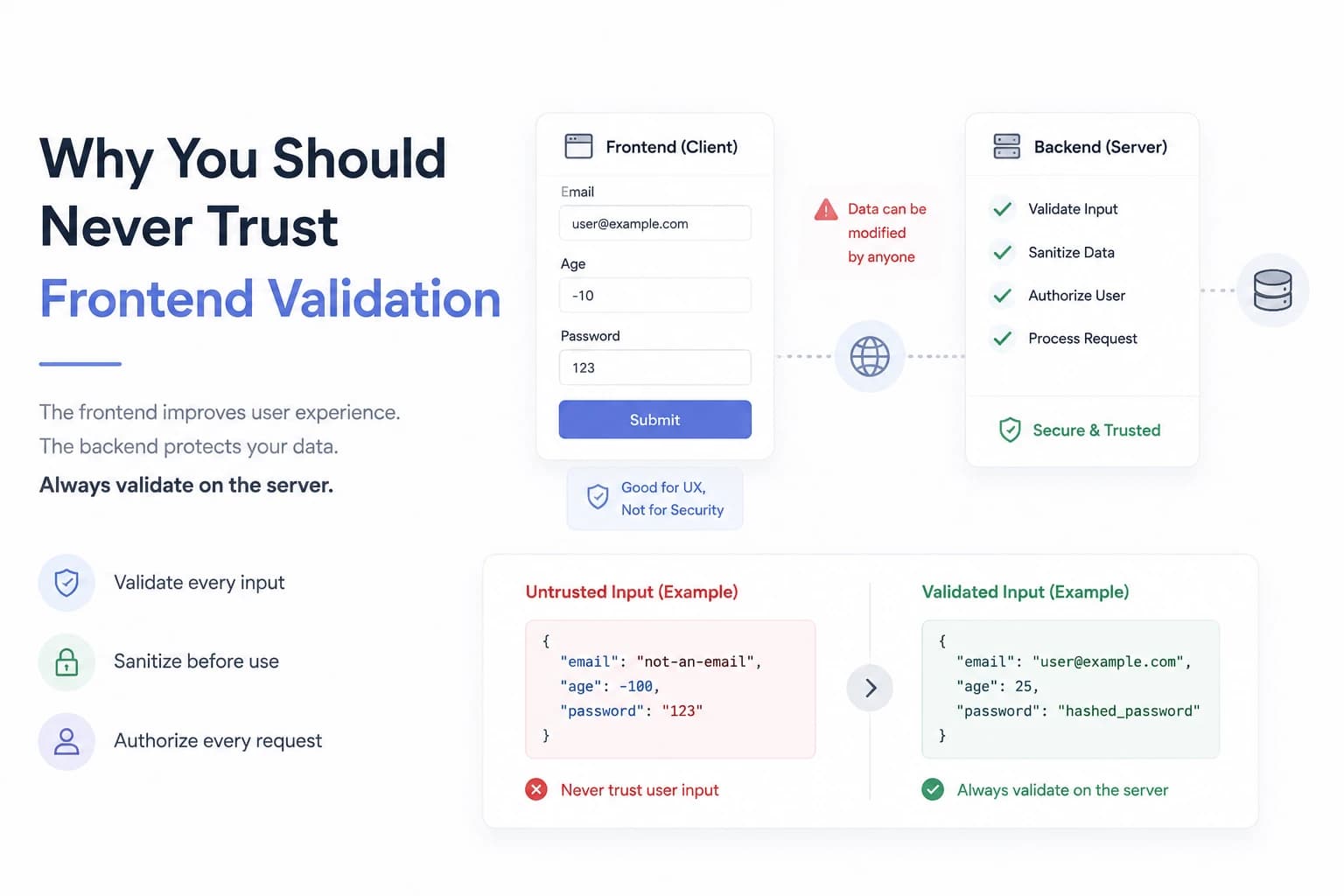
Never Trust User Input: A Fundamental Rule Every Developer Should Follow
Every application interacts with user input—whether it's a login form, search bar, profile update, or payment page. While users are expected to enter valid information, your application should never assume they will.
One of the biggest mistakes new developers make is trusting data that comes from the frontend. It might seem harmless during development, but in production, invalid or malicious input can lead to bugs, security vulnerabilities, data corruption, and even complete system compromise.
If there's one security principle every full-stack developer should remember, it's this:
Never trust user input. Always validate and sanitize it.
Let's explore why.
Why You Should Never Trust the Frontend
Many beginners believe that if a form has validation in React, Vue, or Angular, the backend is safe.
It isn't.
Frontend validation exists to improve the user experience—not to secure your application.
Anyone can bypass your frontend by:
- Sending requests directly with Postman
- Using cURL
- Writing custom scripts
- Modifying requests in browser developer tools
Your backend should assume every incoming request could be incorrect or malicious.
What Can Go Wrong?
Imagine your API expects this request:
{
  "name": "Vaibhav",
  "age": 24,
  "email": "vaibhav@example.com"
}
Instead, someone sends:
{
  "name": "",
  "age": -100,
  "email": "not-an-email"
}
Or worse:
{
  "price": -999999,
  "isAdmin": true
}
Without validation, your database could end up storing invalid or dangerous data.
Common Risks of Trusting User Input
Invalid Data
Bad input leads to inconsistent databases and unexpected application behavior.
Examples include:
- Negative prices
- Empty usernames
- Invalid dates
- Incorrect email formats
- Impossible age values
Security Vulnerabilities
Poor validation can expose your application to attacks such as:
- SQL Injection
- NoSQL Injection
- Cross-Site Scripting (XSS)
- Command Injection
- Path Traversal
Even if you're using modern frameworks, validating input is still essential.
Application Crashes
Imagine this code:
const total = price * quantity;
If price is "hello" instead of a number, calculations may fail or produce unexpected results.
Validating data types prevents these issues before they happen.
Validate on the Server
Frontend validation is optional.
Backend validation is mandatory.
Every API endpoint should verify:
- Required fields
- Data types
- String length
- Numeric ranges
- Allowed values
- Email formats
- Phone numbers
- Dates
Only after validation should data be processed or stored.
Sanitize User Input
Validation checks if data is acceptable.
Sanitization cleans the data before using it.
Examples include:
- Trimming whitespace
- Escaping special characters
- Removing HTML tags when appropriate
- Normalizing email addresses
- Preventing script injection
Validation and sanitization work together to protect your application.
Use Validation Libraries
Writing validation logic manually for every request quickly becomes repetitive.
Popular libraries include:
- Zod
- Joi
- Yup
- Express Validator
- class-validator (NestJS)
These libraries make validation more consistent and easier to maintain.
Never Trust IDs from the Client
A common mistake is assuming a user can access any resource simply because they provide its ID.
For example:
GET /api/orders/123
Before returning the order, always verify:
- Does the order exist?
- Does the authenticated user own it?
- Do they have permission to access it?
Authentication identifies the user.
Authorization determines what they're allowed to do.
Limit Uploaded Files
File uploads deserve special attention.
Always validate:
- File type
- File size
- MIME type
- Allowed extensions
Never rely solely on the file extension, as it can be easily changed.
Return Helpful Error Messages
When validation fails, provide meaningful feedback.
Instead of:
Something went wrong.
Return messages like:
- "Email address is invalid."
- "Password must contain at least eight characters."
- "Price cannot be negative."
Clear feedback improves the user experience while keeping internal system details hidden.
Best Practices
To build secure and reliable applications:
- Never trust client-side validation alone.
- Validate every incoming request on the server.
- Sanitize user input before storing or processing it.
- Use well-tested validation libraries.
- Verify authorization for every protected resource.
- Restrict and validate file uploads.
- Return clear but safe error messages.
- Assume every request could be malformed or malicious.
Final Thoughts
Trusting user input is one of the fastest ways to introduce bugs and security vulnerabilities into your application. While frontend validation creates a smoother user experience, it should never be your only line of defense.
A secure application treats every incoming request with skepticism. By validating, sanitizing, and authorizing user input at the server, you build systems that are not only more secure but also more reliable and easier to maintain.
Good developers make applications work.
Great developers make applications work safely.